Constructing Lines
Use the Line command to construct Lines in a drawing.
To construct a Line or a series of connected Lines:
- Click Draw > Line (or type Line).
- In the graphics area, specify:
- A point to start the line segment.
- A point to end the line segment.
- Another point to define the next segment or press Enter to finish the drawing.
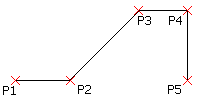
 Each segment in a series of connected Lines is a separate entity. You can also use the Line command to append Lines to existing Lines or Arcs.
To undo a line segment:
- Press Ctrl + Z or type Undo.
To close a Line drawing:
- Specify the Close option.
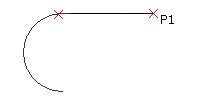
To append a line segment to an existing line or arc:
- Click Draw > Line (or type Line).
- Press Enter.
The appended continuation line attaches to the end of last Line or Arc that you drew.
- Click a point to define the appended line segment and press Enter.
Access
Command: Line
Menu: Draw > Line
Ribbon: Home > Draw > (Flyout) Line 
Tool Palettes: Draw > Line