
Measuring Geometries
Use the MeasureGeometry command to measure distances, radius, angles, and areas within a single command.
The MeasureGeometry command provides options that perform the same calculations as the following commands:
 If the area you want to calculate has geometrically significant points, for example, start or end points of a drawing entity, use EntitySnaps.
To measure geometries:
Click Tools > Inquiry > Measure Geometry (or type MeasureGeometry).
Specify an option:
Distance. Measures the distance between two specified points.
Radius. Measures the radius of a specified arc, circle, or an arc segment of a PolyLine.
Angle. Measures the angle corresponding to a specified arc or two specified line or polyline segments. The displayed measurements depend on the entity that you specify in the graphics area.
Area. Calculates the area and perimeter by specifying a drawing entity or by specifying points that comprise an area to measure in the same way as the GetArea command. The resulting measurements display also the perimeter for closed areas, the length for open PolyLine contours, and the circumference for Circles and Ellipses.
Specify an option:
Specify points. Calculates the area and perimeter defined by points that comprise the area to measure. The defined area highlights dynamically in the graphics area as you specify points.
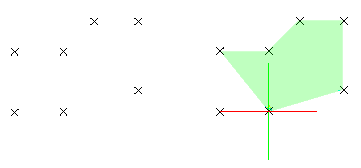
Specify Entity. Calculates regular geometric areas (such as Circles, Ellipses, Arcs, or PolyLine contours). If you specify an entity that is not closed, the area is computed as if it is closed.
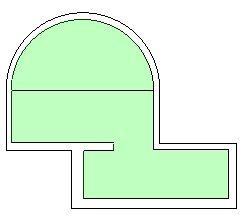
Add. Turns on Add mode and calculates a total area as you specify partial areas by specifying points or using the Specify Entity option. The area and perimeter measurements display.
Example: Add areas of different shapes to determine the total area.
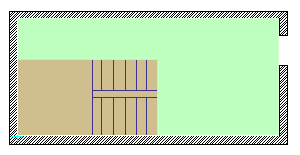
Subtract. Turns on Subtract mode and subtracts a specified area from the total area. The area and perimeter measurements display.
Example: Subtract the area consumed by the stairs from the area of the room.
Divide a shape into regular shapes and use Add and Subtract options to calculate the area during a single operation.
Access
Command: MeasureGeometry
Menu: Tools > Inquiry > Measure Geometry
Ribbon: Home > Tools > Measure Geometry
Related Topics