
-GetNestedProperties
Use the -GetNestedProperties command to display the properties of an entity of a Block or a Reference.
It is the command window variant of the GetNestedProperties command.
To display the properties of a Block entity:
Type -GetNestedProperties at the command prompt.
In the graphics area, select an entity of a block (line, text, attribute, etc.).
The command window displays the entity properties: entity type, Layer, LineColor, and LineStyle. For a text entity, the properties include the TextStyle information.
Example:
The command identifies the selected entity as circle.
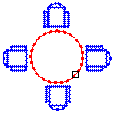
The command window displays the Circle properties:
Component Nested Entity List
-———————————–
\tEntity:\t\tCIRCLE\t\t
\tLayer:\t\t0\n
\tLineColor:\t\tRed\n
\tLineStyle:\t\tBylayer
-———————————–
Access
Command: -GetNestedProperties
Related Topics