Creating Dimensions for BIM Entities
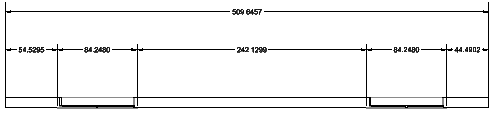
Use the BIMDimensionChain command to create dimension chains for BIM entities. The command automatically detects appropriate dimension points on BIM entities.
Optionally, you can automatically group dimensions within a chain to clearly display opening and wall segments dimensions.
The command uses the dimension standard and tolerance specified in the BIM Settings category of the Options dialog box.
To create a dimension chain:
- Do one of the following:
- On the ribbon, click BIM > Annotate > Dimension Chain
 .
. - On the menu, click BIM > Dimension > Dimension Chain.
- Type BIMDimensionChain.
- On the ribbon, click BIM > Annotate > Dimension Chain
- In the graphics area, specify the BIM entities to dimension and press Enter.
- Specify the suitable alignment:
- Horizontal
- Vertical
- Aligned
- In the graphics area, specify the position of the dimension chain.
Access
Command: BIMDimensionChain
Menu: BIM > Dimension > Dimension Chain
Ribbon: BIM > Annotate > Dimension Chain
Related Topics
Modifying Existing Dimensions for BIM Entities
Automatically Dimensioning BIM Drawings
Parent Topic