Working with Dimensions
There are several dimension tools to display entity measurements and relations between entities.
Elements of a Dimension
Dimensions usually consist of:
- A dimension line or arc.
- Extension lines extending to the measured entity.
- Dimension text.
Ordinate Dimensions, Leaders, and geometric tolerances consist of:
- Dimension text
- Leader line
Dimensions are based on DimensionStyles. DimensionStyles are a named set of defaults that adopt the requirements of specific industries or applications.
Associative Dimensions
By default, Dimensions are related to entities. If you modify an entity's geometry, the Dimensions automatically adjust their location, orientation, and measurements values to reflect the changes.
The Associative property on the Properties palette shows whether a dimension is associative or non-associative.
As the project evolves, changes may cause the loss of the associativity between Dimensions and their related entities. At any time, you can reestablish the relation of Dimensions to entities using the RelateDimensions command.
 Use the Annotation Monitor to identify dimensions that have lost their associativity with related entities.
To control dimensions associativity with related entities:
- Do one of the following:
-
Click Tools > Options (or type Options).
Click Application menu > Preferences (or type Options).
In the Options dialog box, click Drawing Settings
 .
. - Type DrawingSettings.
-
- Expand Behavior and select or clear Enable relative dimensions.
The Annotation Monitor
The Annotation Monitor tracks dimensions and annotations that loose the associativity to their related entities and marks them with an icon  .
.
Clicking the icon displays a menu with options that are available for the non-associated dimension.
| Option |
Description |
|---|---|
| Reassociate | Lets you reassociate the annotation or dimension with the corresponding entities. Specify the point the dimension should relate with. |
| Delete | Deletes the annotation or dimension |
Example:
In the following example, a dimensioned entity is deleted. The Annotation Monitor displays an alert.
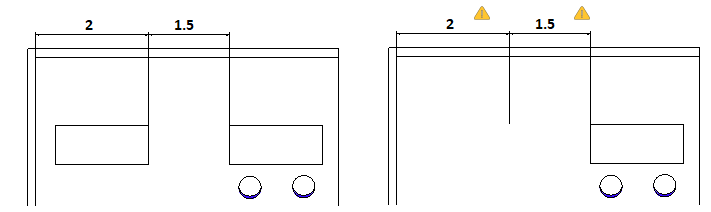
To turn on the Annotation Monitor:
- On the status bar, click AMonitor.
Related Topics
Parent Topic