Modifying RichLines Using Common Editing Commands
RichLines consist of 2 to 16 parallel linear entities created as one object.
You can modify RichLines:
- Using common editing commands, such as Trimm, Extend, and Powertrim
- Using the RichLine editing command EditRichLine
- Using RichLineStyles
The RichLine editing options include:
- Add and delete vertices
- Edit corner joints
- Change the intersection style
- Split and join
Trimming and Extending RichLines
You can shorten or extend RichLines to meet the edges of other entities.
When trimming RichLines, the cutting edge entity must intersect all the lines of the RichLine. Otherwise, the command has no effect.
Example:
Trimming a RichLine
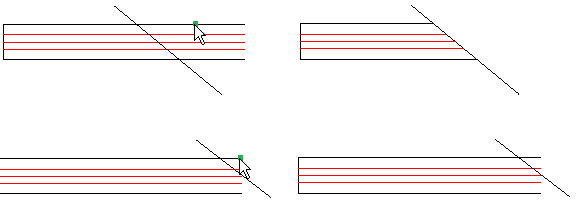
The pointer selections are shown on the left. The result is on the right.
When extending RichLines, the boundary edge must not intersect the lines of the RichLine. Othewise, the command has no effect.
Example:
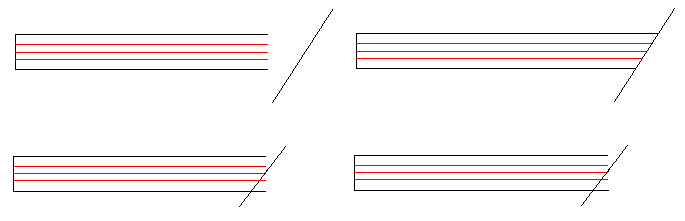
Trimming RichLines at RichLines
You can shorten RichLines using a RichLine as a cutting edge. The command trims the RichLine at the first intersecting line of the RichLine used as cutting edge.
The following intersection options are available:
- Closed
- Open
- Merged
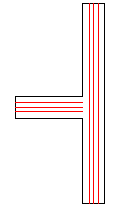
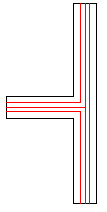
 You can use the Trim command to cleanup cross intersections of RichLines.
Example:
Intersecting RichLines
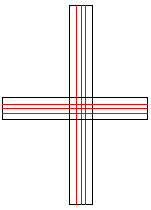
Closed |
Open |
Merged |
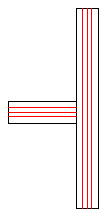 |
 |
 |
Extending RichLines to RichLines
You can use the Extend command to extend RichLines to meet another RichLine. The command extends the RichLine to the first intersecting line of the RichLine used as boundary edge.
The following intersection options are available:
- Closed
- Open
- Merged
Example:
RichLine to extend to another RichLine as boundary edge
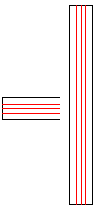
Closed |
Open |
Merged |
|
|
|
Trimming and Extending RichLines Using PowerTrim
You can shorten or extend RichLines to meet the edges of other entities using the PowerTrim command.
When trimming RichLines using the Powertrim command, the trail must intersect all the lines of the RichLine. Otherwise, the command has no effect.
When trimming entities using a RichLine as a cutting edge, the command trims entities at the first intersecting line of the RichLine used as cutting edge.
When trimming RichLines using RichLines as cutting edges, the following intersection options are available:
- Closed
- Open
- Merged
Related Topics
Parent Topic