Constructing Splines
Use the Spline command to create open or closed Splines. Splines are smooth curves that are fit to a set of points.
The Splines you create are called non-uniform rational B-splines (NURBS).
Splines are defined either with fit points, or with control vertices. Accordingly, you can apply two methods with the command:
- Fit points method. Fit points coincide with the Spline. You can fit the Spline to the specified points within a specified tolerance value.
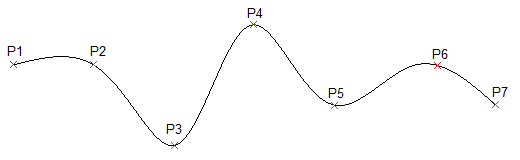
- Control vertices method. Control vertices (CV) define a control frame. Control frames provide an efficient method for shaping the Splines.
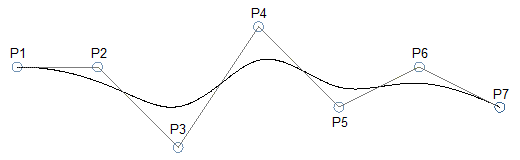
Depending on the selected method, the command prompts differ.
The following procedures describe specific command sequences:
- Spline creation without applying specific options
- Spline creation using fit points
- Spline creation using control vertices
Spline creation without applying specific options
The following command sequence is valid regardless of the method you selected.
To construct Splines:
- Do one of the following:
- On the menu, click Draw > Spline.
- On the ribbon, click Home > Draw > Spline.
- Type Spline at the command prompt.
- In the graphics area, specify the start point of the Spline.
- Specify successive points to continue the Spline.
Use the Undo option to cancel the previous point specification.
- Do one of the following:
- Specify Close to close the Spline curve. This ends the command.
When applying the Fit Points method, specify a closing tangency of the Spline.
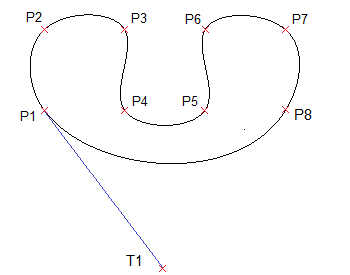
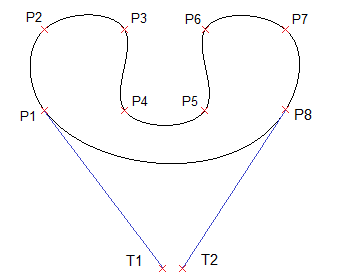
- When applying the Fit Points method, press Enter to specify the Start Tangency of the Spline, then specify the End Tangency to complete the Spline.
- When applying the Control vertices method, press Enter to exit the command. The Spline curve remains open.
- Specify Close to close the Spline curve. This ends the command.
Spline creation using fit points
Running the Spline command using the Fit Points method creates degree 3 (cubic) B-splines. You specify control points through which the Spline passes.
To construct Splines using fit points:
- Run the Spline command.
- Specify the Method option, then specify Fit.
The Fit Points method is the default method unless you change it.
- Do one of the following:
- In the graphics area, specify the start fit point of the Spline.
- Specify options:
- Knots. Specifies the knot computational method.
This option is available only if the Fit method is active.
- Chord. Sets the knots connecting each component curve so that they are proportional to the distances between each associated pair of fit points. This type of knot parameterization is known as chord length method. Chord is the default option.
- Square root. Sets the knots connecting each component curve so that they are proportional to the square root of the distance between each associated pair of fit points. This type of knot parameterization is known as centripetal method.
- Uniform. Sets the distances of the knots of each component curve so that they are equal, regardless of the distance of the fit points. This type of knot parameterization is known as equidistant method method.
Once you have set the option, specify the starting point for the Spline.
- Entity. Converts 2D or 3D quadratic or cubic spline-fit Polylines to equivalent Splines and ends the command.
- Knots. Specifies the knot computational method.
- Specify the next fit point.
- Do one of the following:
- Specify successive fit points to continue the Spline.
- Specify options:
- Fit tolerance. Specifies how closely the Spline matches its fit points.
Setting the fit tolerance to zero forces the Spline to pass through the fit points (default). With a value greater than zero, the Spline passes further away from fit points.
The fit tolerance value applies to all fit points until you change it.
- Undo. Cancels the previous point specification.
- Close. Closes the Spline curve and ends the command.
- Fit tolerance. Specifies how closely the Spline matches its fit points.
- Press Enter to specify the Start Tangency of the Spline, then specify the End Tangency to complete the Spline.
These point specifications determine the tangent conditions on the start point and on the endpoint of the Spline. Lines that are tangent to the Spline display dynamically from the start point and the endpoint of the Spline.
Spline creation using control vertices
Running the Spline command using the Control Vertices method creates Splines of degree 1 (linear), degree 2 (quadratic), degree 3 (cubic), and so on up to degree 5. You specify control points, not points through which the Spline passes.
To construct Splines using control vertices:
- Run the Spline command.
- Specify the Method option, then specify Control vertices (CV).
- Do one of the following:
- Specify the start control point of the Spline.
- Specify options:
- Degree. Specifies the degree for subsequent Spline constructions.
The default value is 3 for degree 3 (cubic) Splines. Specify a value between 1 and 5.
Once you have set the option, specify the starting point for the Spline.
- Entity. Converts 2D or 3D quadratic or cubic spline-fit Polylines to equivalent Splines and ends the command.
Once you have set options, specify the starting point for the Spline.
- Degree. Specifies the degree for subsequent Spline constructions.
- Specify the next control vertex.
- Do one of the following:
- In the graphics area, specify successive points to continue the Spline.
- Specify options as needed:
- Undo. Cancels the previous point specification.
- Close. Closes the Spline curve and ends the command.
Access
Command: Spline
Menu: Draw > Spline
Tool Palettes: Draw > Spline Fit, Spline CV
Ribbon: Home > Draw > (Flyout) Spline Fit