Calculating Areas
Use the GetArea command to calculate the area and perimeter by specifying a drawing entity or by specifying points that comprise an area to measure.
 You can also use the Area option of the MeasureGeometry command.
You can add or subtract areas in a single operation.
The command calculates the following:
- Area, Perimeter, Length, or Circumference of an entity
- Areas defined by specifying points
- Combined areas
To calculate the area and perimeter of a drawing entity:
- Click Tools > Inquiry > Get Area (or type GetArea).
- Specify the Select Entity option.
Use this option to evaluate regular geometric areas (such as Circles, Ellipses, Arcs, or PolyLine contours). If you specify an entity that is not closed, the area is computed as if it is closed.
- In the graphics area, select a drawing entity.
The resulting measurements display. The displayed information depends on the type of the specified drawing entity. For example, for Circles and Ellipses the command displays area and circumference.
To calculate the area and perimeter by specifying points:
- Click Tools > Inquiry > Get Area (or type GetArea).
- In the graphics area, specify points that comprise an area to measure.
The defined area highlights dynamically in the graphics area as you specify points.
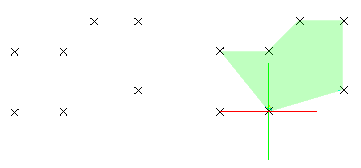 If you want to use specific points from drawing entities, for instance, a start or end point of a drawing entity, use the EntitySnap functions.
 - Press Enter when you finish specifying points.
The area and perimeter measurements display.
To calculate combined areas:
You can calculate the total area of several combined regions by specifying points or by selecting entities. Define an area by specifying points or using the Specify Entity option. Continue adding or removing areas as needed using Add and Subtract options.
- Click Tools > Inquiry > Get Area (or type GetArea).
- Specify the Add or Subtract option to add or subtract a partial area.
- Specify points that comprise an area to measure and press Enter.
- or -
Specify the Select Entity option and select a drawing entity in the graphics area.
The area and perimeter measurements display.
- Repeat step 3 to add or subtract further areas.
The addition or subtraction operation is calculated and the area and perimeter measurements display.
When partial areas are added or subtracted from an area, the evaluated area is the new parameter value unless you explicitly specify a different option.
- Press Enter.
Access
Command: GetArea
Menu: Tools > Inquiry > Get Area
Ribbon: Home > Tools > Inquiry > Get Area
Ribbon: Manage > Utilities > Inquiry > Get Area