Adding a Numbering Sequence to Text Entities

Use the NumberText command to insert sequential numbering to selected text entities.
You can add the sequence as a prefix or as a suffix. Additionally, you can overwrite the existing text.
To add numbering sequence to selected text entities:
- Do one of the following:
- On the ribbon, click XtraTools > Annotation > Number Text.
- On the menu, click XtraTools > Annotation > Number Text.
- Type NumberText.
- In the dialog box, select the sorting method:
- Position X. Sorts the text entities by X coordinate of the insertion point of each text entity.
- Position Y. Sorts the text entities by Y coordinate of the insertion point of each text entity.
- Select order. Sorts the text entities according to the selection order.
- Relative to one point. Sorts the text entities by the distance of each entity to a given point.
- Relative to two points. Sorts the text entities by the distance of each entity to a theoretical rectangle defined by two given points.
- Specify options:
- In Text placement, specify how to apply the sequential numbering:
- Prefix. Places the sequence as prefix of selected text entities.
- Suffix. Places the sequence as suffix of selected text entities.
- Replace. Lets you specify the string from the text entities, which you want to replace with the sequential value.
- Overwrite. Sequential value replaces all current text of entities.
- In Text format, specify an additional prefix and suffix to the number sequence (not the original texts).
- In Sorting direction, select an ascending or a descending order.
- In Counter, specify the counting settings:
- Initial value. First number of the sequence.
- Increment. The difference between the numbers in the sequence.
- Digits. Number of digits of each sequence number.
- In Text placement, specify how to apply the sequential numbering:
- Click OK.
- In the graphics area, select the text entities.
- Press Enter.
Examples:
Initial value = 1, Increment = 1, Text placement: Prefix;
Prefix = N°, Suffix = x1.
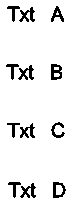
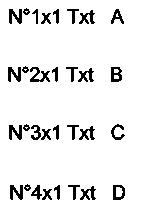
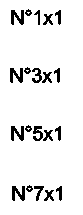
Initial value = 1, Increment = 2, Text placement: Overwrite;
Prefix = N°, Suffix = x1.
Access
Command: NumberText
Menu: XtraTools > Annotation > Number Text
Ribbon: XtraTools > Annotation > Number Text
Parent Topic