Modifying the Draw Order of Entities by Color
Use the DrawOrderByColor command to modify the draw order of the selected entities based on their color.
You can control overlapping of entities according to their color. For example, you can display boundaries in front of solid hatches.
You must define the list of color priorities where the first color on the list is in front and the last color is in the back. The overlapping of entities changes according to the defined color priorities.
Optionally, you can include blocks in your selection and sort the contained entities based on their color.
 DrawOrderByColor does not affect external references.
To modify the draw order of entities by color:
- Do one of the following:
- On the ribbon, click XtraTools > Modify > Draw Order By Color.
- On the menu, click XtraTools > Modify > Draw Order By Color.
- Type DrawOrderByColor.
- In the graphics area, specify the entities.
- Press Enter.
- In the dialog box, set the color priorities using the following buttons:
- Move Top. Moves the selected color on the first position in the color list.
- Move Up. Moves the selected color higher in the color list.
- Move Down. Moves the selected color lower in the color list.
- Move Bottom. Moves the selected color on the last position in the color list.
- In the dialog box, set options:
- Modify blocks. Sorts the entities contained in block instances based on their color.
- Modify only the entities with assigned color. Sorts only the entities that have a specific color asigned. For example, entities with ByLayer or ByBlock are ignored.
- In Re-ordering method, select the sorting method:
- Draw order. Sorts the entities using the DisplayOrder command.
- Handles. Sorts the entites physically in the drawing database. Creates entity copies and places them above the others.
When Handles is enabled, some entities, such as hatches or groups, can lose their associative property. The sorting direction is always Front.
- In Draw order location, specify the sorting direction:
- Front. Sorts the entities by colors in front-to-back order and brings to front entities that are not specified in the color list.
- Back. Sorts the entities by colors in front-to-back order and sends behind entities that are not specified in the color list.
- Click OK.
| Initial situation |
Priorities |
Result |
 |
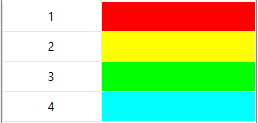
In the dialog box, specify the following color priorities and select Front.
 |
 |
Command: DrawOrderByColor
Menu: XtraTools > Modify > Draw Order By Color
Ribbon: XtraTools > Modify > Draw Order By Color