Creating Additional LineStyles
Use the MakeLineStyle command to create a new LineStyle from the specified entities in drawing.
You can use points, text, shapes, lines and polylines to define the pattern for the new LineStyle.
To create a new LineStyle:
- Draw the entities defining the pattern of the LineStyle.
- Do one of the following:
- On the ribbon, click XtraTools > Utilities > Make LineStyle.
- On the menu, click XtraTools > Utilities > Make LineStyle.
- Type MakeLineStyle.
- In the dialog box, click Browse.
- Select a LineStyle file (.lin) and click Save.
The new LineStyle is stored in the selected file.
- In Name, type the name of the new LineStyle.
- In Description, type a short text describing the new LineStyle.
 Note: If Description is empty, the command creates an automatic description.
- Click OK.
- In the graphics area, specify the segment that will be repeating throughout the LineStyle:
- A point to start the line definition.
- A point to end the line definition.
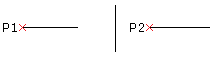
- In the graphics area, select lines, polylines, points, shapes, or text objects for the line style pattern and press Enter.
The new LineStyle is created. You can use it immediately.
Command: MakeLineStyle
Menu: XtraTools > Utilities > Make LineStyle
Ribbon: XtraTools > Utilities > Make LineStyle