
도면요소 선택 방법 적용
도면요소를 지정하는 프롬프트가 나타나면 다음 표에 나와 있는 옵션(또는 괄호 안의 바로가기 키) 중 하나를 입력합니다.
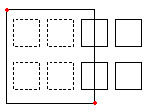
창(w) |
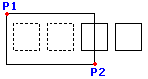
두 개의 반대 점으로 정의한 사각형 안에 완전히 포함되어 있는 모든 도면요소를 지정합니다. |
|---|---|
|
직사각형 선택 창은 두 개의 대칭 구석 점으로 정의됩니다. 직사각형 선택 윈도우는 두 대각선 모서리 점으로 정의됩니다. 선택 윈도우의 첫 번째 모서리에 포인터를 놓고 해당 점을 클릭하십시오. 윈도우 내부에 완전히 포함된 모든 엔티티를 지정하려면 두 번째 모서리 점을 클릭하십시오. |
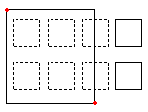
교차(C) |
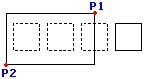
두 개의 반대 점으로 정의한 사각형 안에 있는 도면요소를 지정합니다. 도면요소는 사각형 밖으로 연장될 수 있습니다. |
|
교차 방법을 사용하여 엔티티를 지정할 때, 외곽선이 창과 교차하거나 창 안에 있는 엔티티가 선택됩니다. 포인터 창이 원하는 도면 엔티티를 포함하거나 교차하도록 배치합니다. 포인터의 창이 원하는 도면요소를 포함하거나 교차하도록 위치시킵니다. |
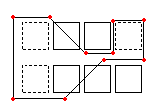
WPolygon(WP) |
지정한 점으로 정의한 다각형 안에 완전히 포함되어 있는 도면요소를 지정합니다. |
|
Window 모드와 마찬가지로, Window Polygon 모드는 선택 윈도우 내부에 윤곽선이 완전히 포함된 모든 도면 엔티티를 지정합니다. Window 모드와 달리, Window Polygon 모드에서는 무제한의 코너 포인트를 가진 불규칙한 윈도우를 스케치할 수 있습니다. WPolygon을 사용하려면, 선택 윈도우의 코너 포인트를 정의하십시오. 폴리곤 선은 서로 교차하여 루프를 형성할 수 있습니다. 선택 윈도우를 완료하려면 Enter 키를 누르십시오. 윈도우 내부에 완전히 포함된 모든 엔티티가 선택됩니다. Window 모드와 마찬가지로, Window Polygon 모드는 선택 윈도우 내부에 윤곽선이 완전히 포함된 모든 도면 엔티티를 지정합니다. Window 모드와 달리, Window Polygon 모드에서는 무제한의 코너 포인트를 가진 불규칙한 윈도우를 스케치할 수 있습니다. WPolygon을 사용하려면, 선택 윈도우의 코너 포인트를 정의하십시오. 폴리곤 선은 서로 교차하여 루프를 형성할 수 있습니다. 선택 윈도우를 완료하려면 Enter 키를 누르십시오. 윈도우 내부에 완전히 포함된 모든 엔티티가 선택됩니다. |
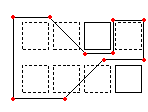
CPolygon(CP) |
지정된 점으로 정의된 폴리곤 내의 엔티티를 지정합니다. 엔티티는 폴리곤을 넘어 확장될 수 있습니다. |
|
올가미 선택 방법을 사용하면 불규칙한 형태의 윤곽선이 작성됩니다. 올가미 윤곽선 안에 있거나 올가미 윤곽선과 교차될 수 있는 모든 도면요소가 선택됩니다. 선택 창의 구석 점을 지정합니다. 미리보기 모드는 새로 생성된 다각형을 보여줍니다. 다각형 선은 자체 교차할 수 있고 루프를 형성할 수 있습니다. 선택 창을 완료하려면 Enter를 누릅니다. 교차 다각형 안에 있거나 교차하는 모든 도면요소가 수정 대상으로 지정됩니다. |
울타리(F) |
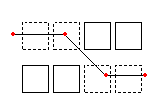
사용자가 지정한 울타리를 통과하는 모든 도면요소를 지정합니다. 울타리 선택 방법은 울타리가 닫힌 형상이 아니라는 것을 제외하고는 CPolygon과 유사합니다. |
|
Fence 모드는 교차 선택 모드의 효과적인 변형입니다. 지정할 엔티티는 윈도우로 둘러싸이거나 교차되지 않고, 대신 선, 즉 “펜스”로 “잘라냅니다”. 무제한의 점으로 펜스를 정의합니다. 펜스는 자신과 교차할 수 있습니다. 펜스를 완료하려면 Enter 키를 누릅니다. 선과 교차하는 모든 엔티티는 선택 세트에 추가됩니다. Fence 모드는 교차 선택 모드의 효과적인 변형입니다. 지정할 엔티티는 윈도우로 둘러싸이거나 교차되지 않고, 대신 선, 즉 “펜스”로 “잘라냅니다”. 무제한의 점으로 펜스를 정의합니다. 펜스는 자신과 교차할 수 있습니다. 펜스를 완료하려면 Enter 키를 누릅니다. 선과 교차하는 모든 엔티티는 선택 세트에 추가됩니다. |
이전(P) |
최근의 도면요소 선택 세트를 다시 지정합니다. |
실행 취소 옵션은 최근의 선택을 반전합니다. Previous 옵션은 이전 선택 세트를 복원합니다. 참고: Last 및 All 방법과 마찬가지로, 동결된 레이어의 엔티티는 선택되지 않으며, 잠긴 레이어의 엔티티는 선택되지만 처리할 수 없습니다. |
|
마지막(L) |
최근에 생성된 보이는 도면요소를 지정합니다. |
각도 옵션은 치수 문자의 각도를 변경합니다. Last 옵션은 마지막으로 그린 엔티티를 선택 세트에 추가합니다. 참고: 마지막으로 그린 엔티티가 동결된(frozen) 레이어에 있는 경우, 어떤 엔티티도 선택되지 않습니다. |
|
그룹 (예) |
지정된 EntityGroup의 엔티티를 지정합니다. |
EGroup 옵션은 그룹의 이름으로 지정된 EntityGroup의 엔티티를 선택합니다. EntityGroup 명령을 사용하여 EntityGroup을 생성합니다. |
|
추가(A)/제거(R) |
기본 추가/제거 모드 간을 전환합니다. |
추가 옵션은 기본 모드로, 언제든지 도면요소를 지정하고 선택 세트에 추가할 수 있습니다. 추가 옵션은 기본 모드이며, 엔티티를 지정하고 언제든지 선택 세트에 추가할 수 있습니다. 제거 옵션은 대신 이전에 선택된 엔티티를 선택 세트에서 제거합니다. 제거 모드는 엔티티 선택 프롬프트를 엔티티 제거로 변경합니다. 이미 선택된 엔티티는 다시 선택되면 선택 세트에서 제거됩니다. |
|
실행 취소(U) |
최근에 선택된 도면요소를 선택 취소합니다. |
실행 취소 옵션은 최근의 선택을 반전합니다. |
|
모두(ALL) |
모든 도면층의 모든 도면요소를 지정합니다. |
모두 옵션은 도면에서 동결된 도면층에 있는 도면요소를 제외한 모든 도면요소를 선택합니다. |
|
단일(SI)/다중(M) |
단일/다중 선택 방법 간을 전환합니다. |
1개 모드에서는 하나의 도면요소를 지정하면 도면요소 선택이 완료됩니다. 다중 모드에서는 도면요소를 강조 표시하지 않고 여러 개의 점을 지정하여 도면요소를 선택합니다. 다중 모드는 또한, 교차점을 두 번 선택하는 경우라도 두 개의 교차되는 도면요소를 선택합니다. |
|
자동(AU) |
도면요소를 가리키면 도면요소가 선택되는 자동 모드로 전환합니다. 빈 공간을 가리키면 도면 요소 선택 상자가 시작됩니다. |
자동과 모두는 기본 도면요소 선택 모드입니다. |
|
상자(BOX) |
창과 교차 선택 방법이 혼합된 포인터 선택 방법으로 도면요소를 지정합니다. 선택 사각형의 반대 점을 오른쪽에서 왼쪽으로 지정하면 상자 선택과 교차 선택 방법이 동일해집니다. 이와 반대면, 상자 선택이 창 선택과 동일해집니다. |
|
창을 왼쪽에서 오른쪽으로 지정하면 선택 창 안의 도면요소가 지정됩니다. 창을 오른쪽에서 왼쪽으로 그리면 선택 창 내부에 있거나 선택 창과 교차하는 엔티티를 지정합니다. |
관련 항목
부모 주제