
Aligning Workspaces
Use the AlignWorkspaces command to adjust the zoom factor and position of the current view, based on the alignment points specified in the Model workspace and Sheet workspace. The tool alignes the points specified in the Model workspace with the points specified in the Sheet workspace.
 Not: Bu komut yalnızca Sayfa modunda kullanılabilir.
Additionally, you can use the command for the following operations:
Position a view correctly within a viewport, based on one point specified in Model workspace and one point in Sheet workspace. The zoom factor of the viewport does not change.
Model çalışma alanında veya Sayfa çalışma alanında yalnızca bir nokta belirtmek için, ikinci nokta istemi geldiğinde Enter tuşuna basın.Zoom a view based on two points specified in Model workspace and two points in Sheet workspace. The zoom factor and the custom coordinate system (CCS) are adjusted according to the specified points.
To align workspaces:
Aşağıdakilerden birini yapın:
On the ribbon, click XtraTools > View > Align Workspaces.
On the menu, click XtraTools > View > Align Workspaces.
Type AlignWorkspaces.
In Model workspace, specify two points (P1 and P2) to align.
In Sheet workspace, specify two points (P3 and P4) to align with.
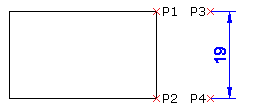
Enter tuşuna basın.
The content from the Model workspace is aligned with Sheet workspace.
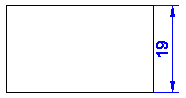
Erişim
Command: AlignWorkspaces
Menu: XtraTools > View > Align Workspaces
Ribbon: XtraTools > View > Align Workspaces
Üst Öğe Konusu