
Displaying the Properties of a Block Entity
Use the GetNestedProperties command to display the properties of an entity of a Block or a nested Reference.
To display the properties of a nested reference:
Aşağıdakilerden birini yapın:
On the ribbon, click XtraTools > Block > Get Nested Properties.
On the menu, click XtraTools > Block > Get Nested Properties.
Type GetNestedProperties.
In the graphics area, select an entity of a block.
A dialog box displays the Block properties: Block name, Layer, LineColor, and LineStyle.
Örnek:
The command identifies the selected entity as Block.
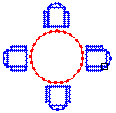
Block name: CHAIR
Layer: 0
LineColor: Blue
LineStyle: ByLayer
To display the properties of an entity of a Block:
Aşağıdakilerden birini yapın:
On the ribbon, click XtraTools > Block > Get Nested Properties.
On the menu, click XtraTools > Block > Get Nested Properties.
Type GetNestedProperties.
In the graphics area, select an entity of a block (line, text, attribute, etc.).
A dialog box displays the entity properties: entity type, Layer, LineColor, and LineStyle. For a text entity, the properties include the TextStyle information.
Örnek:
The command identifies the selected entity as circle.
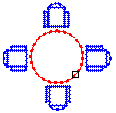
The dialog box displays the Circle properties:
Entity: CIRCLE
Layer: 0
LineColor: Red
LineStyle: ByLayer
Erişim
Command: GetNestedProperties
Menu: XtraTools > Block > Get Nested Properties
Ribbon: XtraTools > Block > Get Nested Properties
Üst Öğe Konusu