
Creating Additional LineStyles
Use the MakeLineStyle command to create a new LineStyle from the specified entities in drawing.
You can use points, text, shapes, lines and polylines to define the pattern for the new LineStyle.
To create a new LineStyle:
Draw the entities defining the pattern of the LineStyle.
Aşağıdakilerden birini yapın:
On the ribbon, click XtraTools > Utilities > Make LineStyle.
On the menu, click XtraTools > Utilities > Make LineStyle.
Type MakeLineStyle.
İletişim kutusunda Gözat öğesine tıklayın.
Select a LineStyle file (.lin) and click Save.
The new LineStyle is stored in the selected file.
In Name, type the name of the new LineStyle.
In Description, type a short text describing the new LineStyle.
 Not: Açıklama boş ise, komut otomatik bir açıklama oluşturur.
Tamam’a tıklayın.
In the graphics area, specify the segment that will be repeating throughout the LineStyle:
Çizgi tanımını başlatmak için bir nokta.
Çizgi tanımını bitirecek bir nokta.
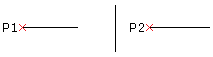
In the graphics area, select lines, polylines, points, shapes, or text objects for the line style pattern and press Enter.
The new LineStyle is created. You can use it immediately.
Erişim
Command: MakeLineStyle
Menu: XtraTools > Utilities > Make LineStyle
Ribbon: XtraTools > Utilities > Make LineStyle
Üst Öğe Konusu