
Exporting Tables
Use the ExportTable command to export tables in a comma separated format (CSV).
CSV (Comma-separated Values) is an ASCII file format that stores tabular data for spreadsheet or database software. Commas separate cell values. Strings are enclosed by single quotation marks. You can import CSV files in Microsoft Excel or other CSV compatible applications.
Note: CSV files do not retain text formatting or table formatting, such as cell color, merged cells and border style.
To export tables:
In the graphics area, specify the table.
Do one of the following:
On the ribbon, click Annotate > Table > Export Table.
Right-click and click Export Table.
Type ExportTable.
In the dialog box, specify the following:
Save in. Navigate to the folder where you want to store the file.
File name. Type a name for the file.
Click Save.
The command generates the CSV file.
Example:
Table:
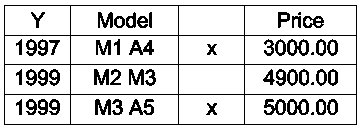
Export file (.csv format):
Access
Command: ExportTable
Ribbon: Annotate > Table > Export Table
Parent Topic