
Modifying RichLines
Use the EditRichLine command to modify RichLines. You can edit intersecting and adjoining RichLines, break and weld RichLines, and add or delete vertices to or from existing RichLines.
To edit intersecting RichLines:
Click Modify > Entity > RichLine (or type EditRichLine).
In the dialog box, select Closed Cross
 , Open Cross
  , or Merged Cross
  .
.Click OK.
In the graphics area, specify the first of two intersecting RichLines.
Specify the second RichLine.
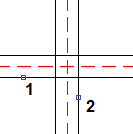
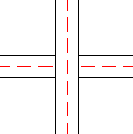
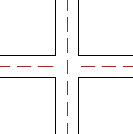
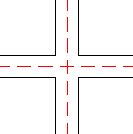
The intersection between the two RichLines results in one of the following:
Closed Cross:
Open Cross:
Merged Cross:
Repeat steps 4 and 5 if necessary.
Press Enter.
To create tee connections from two RichLines:
Click Modify > Entity > RichLine (or type EditRichLine).
In the dialog box, select Closed Tee
 , Open Tee
  , or Merged Tee
  .
.Click OK.
In the graphics area, specify the RichLine to trim or extend.
Specify the RichLine to use as the boundary line.
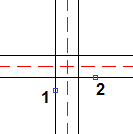
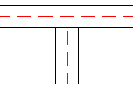
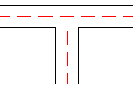
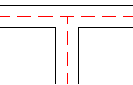
The tee connection between the two RichLines results in one of the following:
Closed Tee:
Open Tee:
Merged Tee:
Repeat steps 4 and 5 if necessary.
Press Enter.
To create a corner joint from two RichLines:
Click Modify > Entity > RichLine (or type EditRichLine).
In the dialog box, select Corner Joint
 .
.Click OK.
In the graphics area, specify a RichLine.
Specify a RichLine that crosses the first RichLine.
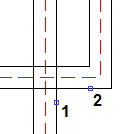
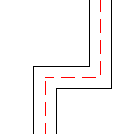
The RichLines are trimmed or extended at their intersection.
Repeat steps 4 and 5 if necessary.
Press Enter.
To cut RichLines:
Click Modify > Entity > RichLine (or type EditRichLine).
In the dialog box, select Cut Single
 to cut off a section from a single element in a RichLine, or Cut All
  to cut off a section from the entire RichLine.
Click OK.
In the graphics area, specify a RichLine.
The point you click is where the break begins.
Specify the second point to define the section to delete.
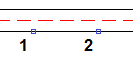
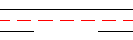
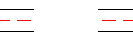
The portion between the two points is removed:
Cut Single:
Cut All:
Repeat steps 4 and 5 if necessary.
Press Enter.
 You can cut off one end of a RichLine by clicking a RichLine at the point where you want the new end point, then click the other point past the RichLine’s current end point.
To weld aligned RichLines:
Click Modify > Entity > RichLine (or type EditRichLine).
In the dialog box, select Weld All
 .
.Click OK.
In the graphics area, specify a RichLine.
Specify the RichLine to rejoin.
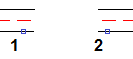 Result: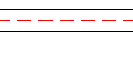
Repeat steps 4 and 5 if necessary.
Press Enter.
To add vertices to RichLines:
Click Modify > Entity > RichLine (or type EditRichLine).
In the dialog box, select Add Vertex
 .
.Click OK.
In the graphics area, click the RichLine where you want to place new vertices.
Vertices are added at the specified points.
Press Enter.
To move RichLine vertices, use EntityGrips on RichLines.
To delete vertices from RichLines:
Click Modify > Entity > RichLine (or type EditRichLine).
In the dialog box, select Delete Vertex
 .
.Click OK.
In the graphics area, click the RichLine near vertices to delete.
Vertices are deleted from the specified points.
Press Enter.
To see RichLine vertices, turn on EntityGrips and select RichLines.
Access
Command: EditRichLine
Menu: Modify > Entity > RichLine
Related Topics
Parent Topic