
Applying EntityGrip Nodes
EntityGrips (EGrips) are selectable handles displayed as small squares at the end points, centers, vertices, insertion points, and other geometric points of solids.
Every solid displays some EntityGrips after selection. You can edit the solids by dragging them. Their shape specifies how the EGrip changes the solid.
There are two types of EGrips:
Corner EGrips (squares): modify the solid by stretching in any direction or change the location of the solid.
Arrow EGrips (triangles): modify the solid by stretching the EGrip forward or backward.
When selected, EGrips change to red.
This table lists entities that have EGrips, where they are located, and the result of how the EGrips modify the entity.
EntityGrip Nodes and Editing Results
Entity |
Location |
Result |
|---|---|---|
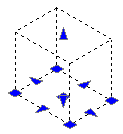
Box |
Base center |
Moves the box |
Four base corners |
Modifies the length and width of the box |
|
Base midpoints (arrow EGrips) |
Modifies the length and width of the box in the direction of the arrow |
|
Top and bottom (arrow EGrips) |
Modifies the height of the box in the direction of the arrow |
|
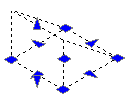
Wedge |
Base center |
Moves the wedge |
Four base corners |
Modifies the length and the width of the wedge base |
|
Base midpoints (arrow EGrips) |
Modifies the length and width of the wedge base in the direction of the arrow |
|
Top and bottom (arrow EGrips) |
Modifies the height of the wedge in the direction of the arrow |
|
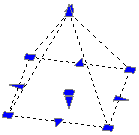
Pyramid |
Base center |
Moves the pyramid |
Base corners, Base midpoints |
Modifies corners and sides uniformly. Note: You cannot modify one corner or one side individually. |
|
Top point (apex EGrip) |
Modifies the height of the pyramid |
|
Top point (radius EGrip) |
Modifies the pyramid shape (truncated pyramid) |
|
Note: You cannot modify the number of sides using EGrips. Use the Properties palette to specify any number of sides. |
||
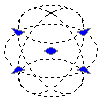
Sphere |
Center |
Moves the sphere |
Four circumference points |
Modifies the diameter of the sphere |
|
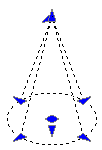
Cone |
Base center |
Moves the cone |
Top point (apex EGrip) |
Modifies the height of the cone in the direction of the arrow |
|
Top point (radius EGrip) |
Modifies the cone shape (truncated cone) |
|
Four circumference points |
Modifies the base radius of the cone |
|
Bottom arrow EGrip |
Modifies the height of the cone in the direction of the arrow |
|
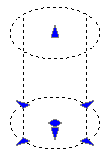
Cylinder |
Base center |
Moves the cylinder |
Four circumference points |
Modifies base radius of the cylinder |
|
Top and bottom (arrow EGrip) |
Modifies the height of the cylinder in the direction of the arrow |
|
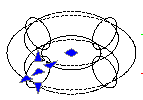
Torus |
Center |
Moves the torus |
Section center (arrow EGrip) |
Modifies the radius of the torus |
|
Four circumference points |
Modify the radius of the tube |
|
Related Topics
Modifying Solids Using EntityGrips
Parent Topic