
3D Viewing Using Free Orbit
Use the RollViewFree command to view your model interactively in 3D space without constraining the roll.
An arcball lets you define the orbit observation point.
To view the model in 3D using free orbit:
Do one of the following:
On the menu, click View > 3D Orbit > Free Orbit.
On the ribbon, click View > Render > Free Orbit
 .
.
Type RollViewFree.
In the graphics area, drag the pointer to orbit around the model.
An arcball with four small circles at each quadrant appears to let you specify camera motion and position.
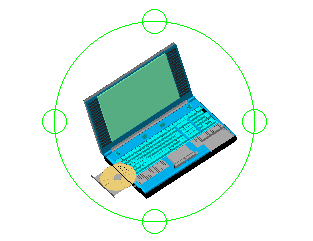
For more information, see Using the Arcball in Constrained Orbit Mode.
Press Esc or Enter to exit Constrained Orbit mode.
Access
Command: RollViewFree
Menu: View > 3D Orbit > Free Orbit
Ribbon: View > Render > Free Orbit
Toolbar: Free Orbit 
Related Topics
Using the Arcball in Constrained Orbit Mode
3D Viewing Using Constrained Orbit
Parent Topic