Applying Rotate Activities
Use Rotate activities to rotate entities from the selection set.
You can apply a Rotate activity only to a Rotation element.
Note: During Block definition, you can choose any point as the rotation base point.
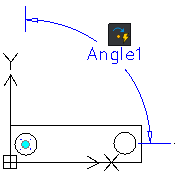
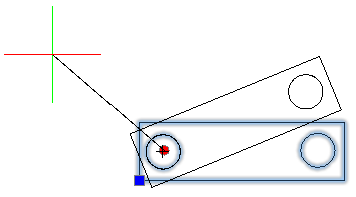
Rotate Activity Base Point
You can specify whether the base point of the Rotate activity coincides with the main point of the Rotation element or is an independent point.
The Base Type property specifies the type of base point:
- Dependent. The base point of the Rotation activity is the Rotate element main point. The entities from the selection set rotate around the Rotate element main point. Moving the main point of the Rotate element, changes the Rotation base point location. Dependent base point has no grip point.
- Independent. Lets you specify an independent base point by picking a fixed location in the CustomBlock reference. Use the grip point to change the base point location.
Example
The following Block represents a table and six chairs. The Block definition contains a Rotation element and a Rotate activity. The Rotation element main point is in the center of the table.
- If the Base Type is Dependent, the Rotation activity rotates entities around the center of the table.
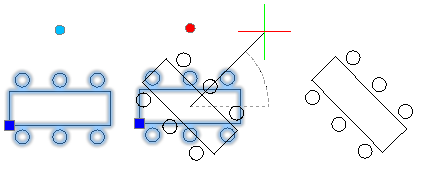
- If the Base Type is Independent and the independent base point is the lower left corner of the table. Thus, the table and the chairs rotate around the lower left corner.
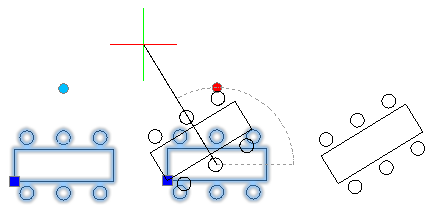
To apply a rotate activity to a CustomBlock definition:
- In the Block Editor, type CBActivityTool at the command prompt.
- Specify the Rotate option.
- In the graphics area, specify a rotate elements to associate with the activity.
- Select the entities to associate with the activity and press Enter.
The activity icon displays on the specified element.