Applying Polar Stretch Activities
Use Polar Stretch activities to move, stretch, and rotate the entities from the selection set with a specified angle and distance.
You can apply a Polar Stretch activity only to polar elements. The polar stretch activity lets you stretch the entities from the selection set at any angle.
When associating a polar stretch activity with an element, you need to specify the stretch frame for the polar stretch activity, the entities to stretch, and the entities to rotate.
- Entities that lie completely within the stretch frame are moved.
- Entities included in the selection set whose outlines intersect the stretch frame are stretched. Entities specified for rotate only in the activity's selection set are not stretched.
- Entities not included in the selection set are not affected, regardless of whether they are within or crossed by the stretch frame.
- Entities outside the stretch frame and included in the selection set are moved.
Example:
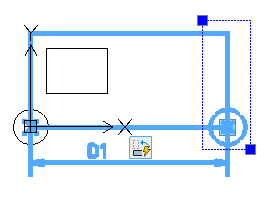
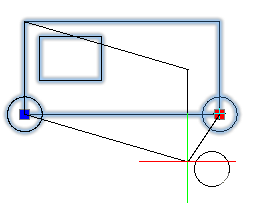
In the following example, the rectangle is selected for stretching and the circle for rotation only.
To apply a polar stretch activity to a CustomBlock definition:
- In the Block Editor, type CBActivityTool at the command prompt.
- Specify the Polar Stretch option.
- In the graphics area, specify the polar element to associate with the activity.
- Specify the element point to associate with the activity.
- Specify the first corner of the stretch frame.
- Specify the second corner of the stretch frame.
- Specify the entities to stretch and press Enter.
- Specify the entities to rotate only and press Enter.
The activity icon displays on the specified element.