
Obje Seçim Yöntemlerini Uygulama
Objeler belirtmeniz istendiğinde, aşağıdaki tablodaki seçeneklerden birini (veya parantez içindeki kısayolunu) girin.
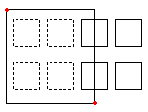
Pencere (w) |
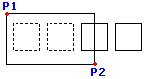
İki karşıt nokta ile tanımlanan bir dikdörtgenin içinde bulunan tüm objeleri belirtir. |
|---|---|
|
Dikdörtgen bir seçim Penceresi, iki zıt köşe noktası tarafından tanımlanır. Dikdörtgen bir seçim Penceresi, iki karşıt köşe noktası tarafından tanımlanır. Seçim penceresinin ilk köşesinin üzerine işaretçiyi konumlandırın ve o noktaya tıklayın. Pencerenin tamamen içinde yer alan tüm varlıkları belirtmek için ikinci köşe noktasına tıklayın. |
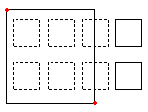
Kesişen (c) |
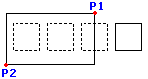
İki karşıt nokta ile tanımlanan bir dikdörtgenin içindeki objeleri belirtir. Objeler, dikdörtgenin dışına uzatılabilir. |
|
Çaprazlama yöntemi kullanılarak varlıkları belirtirken, çizimlerin çerçeveleriyle kesişen veya pencere içinde yer alan varlıklar seçilir. İşaretçiyi, istenen çizim varlıklarını içerecek veya kesişecek şekilde konumlandırın. İmleci, istenen teknik resim objelerini içerecek veya kesişecek şekilde konumlandırın. |
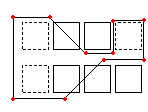
WPolygon (wp) |
Tamamen belirtilen noktalarla tanımlanan bir çokgenin içinde bulunan objeleri belirtir. |
|
WPolygon modunu kullanmak için, seçim penceresi için köşe noktalarını tanımlayın. Çokgen çizgileri kendileriyle kesişebilir ve döngüler oluşturabilir. Seçim penceresini tamamlamak için Enter tuşuna basın. Tamamen pencerenin içinde bulunan tüm objeler seçilir. WPolygon modunu kullanmak için, seçim penceresi için köşe noktalarını tanımlayın. Çokgen çizgileri kendileriyle kesişebilir ve döngüler oluşturabilir. Seçim penceresini tamamlamak için Enter tuşuna basın. Tamamen pencerenin içinde bulunan tüm objeler seçilir. |
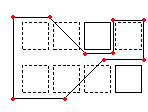
CPolygon (cp) |
Belirtilen noktalarla tanımlanan bir çokgen içindeki objeleri belirtir. Objeler, çokgenin dışına uzatılabilir. |
|
Kement seçimi yöntemi, düzensiz şekilli bir kontur oluşturur. Kement konturunun içinde kalan ve muhtemelen kementle kesişen tüm objeler seçilir. Seçim penceresi için köşe noktalarını tanımlayın. Önizleme modu ortaya çıkan çokgeni gösterir. Çokgen çizgileri kendileriyle kesişebilir ve döngüler oluşturabilir. Seçim penceresini tamamlamak için Enter tuşuna basın. Kesişen çokgen içindeki ve onunla kesişen tüm objeler değişiklik için belirtilir. |
Çit (f) |
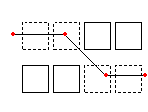
Belirlediğiniz bir çitten geçen tüm objeleri belirtir. Çit yöntemi, çitin kapalı olması dışında CPolygon yöntemine benzer. |
|
Sınırsız noktalı çiti tanımlayın. Çit kendisi ile kesişebilir. Çiti tamamlamak için Enter tuşuna basın. Çizgi ile kesişen tüm objeler seçim kümesine eklenir. Sınırsız noktalı çiti tanımlayın. Çit kendisi ile kesişebilir. Çiti tamamlamak için Enter tuşuna basın. Çizgi ile kesişen tüm objeler seçim kümesine eklenir. |
Önceki (p) |
En yeni obje seçim kümesini yeniden belirtir. |
Geri Al seçeneği, en son seçimi geri alır. Not: Son ve Tümü yöntemlerinde olduğu gibi, dondurulmuş Katman üzerindeki objeler seçilmez ve kilitli Katman üzerindeki objeler seçilir, ancak işlenemez. |
|
Son (l) |
En son oluşturulan görünür objeyi belirtir. |
Açı seçeneği, Ölçümlendirme metninin açısını değiştirir. Not: Son çizilen obje dondurulmuş Katman üzerinde bulunuyorsa, hiçbir obje seçilmez. |
|
Grup (eg) |
Belirli bir EntityGroup’un varlıklarını belirtir. |
EGroup seçeneği, grubun adıyla belirtilen bir EntityGroup’un varlıklarını seçer. EntityGroup’ları EntityGroup komutunu kullanarak oluşturun. |
|
Ekle (a) / Kaldır (r) |
Varsayılan Ekle ve Kaldır modu arasında geçiş yapar. |
Ekle seçeneği, varsayılan moddur, size herhangi bir zamanda objeleri belirtme ve onları seçim setine ekleme imkanı verir. Kaldır seçeneği ise, daha önce seçilen objeleri seçim kümesinden kaldırır. Kaldır modu, obje seçim istemini Objeleri Kaldır olarak değiştirir. Seçili olan objeler, tekrar seçilirse, seçim kümesinden kaldırılır. |
|
Geri al (u) |
En son seçilen objelerin seçimini kaldırır. |
Geri Al seçeneği, en son seçimi geri alır. |
|
Tümü (all) |
Tüm Katmanlardaki tüm objeleri belirtir. |
Tümü seçeneği, dondurulmuş Katmanlarda bulunanlar hariç, teknik resimdeki tüm objeleri seçer. |
|
Tek (si) / Çoklu (m) |
Tek ve Çoklu seçim yöntemleri arasında geçiş yapar. |
Tek modda, bir objeyi belirtirsiniz, ardından obje seçimi tamamlanır. Çoklu modu ile objeleri, vurgulamadan birden çok nokta belirterek seçersiniz. Çoklu mod, ayrıca, kesişme noktası iki kez seçilse bile iki kesişen objeyi seçer. |
|
Otomatik (au) |
Objeyi göstererek seçebileceğiniz Otomatik moda geçer. Boş konumu gösterme, obje seçim kutusunu başlatır. |
Otomatik ve Tümü, obje seçimi için varsayılan modlardır. |
|
Kutu (box) |
Pencere ve Kesişen yöntemlerinin kombinasyonu olan imleç yöntemi ile objeleri belirtir. Seçim dikdörtgeninin karşıt noktaları sağdan sola belirtilmişse, Kutu Kesişen yöntemine eşdeğerdir. Aksi halde, Kutu Pencere yöntemine eşdeğerdir. |
|
Pencereyi soldan sağa çizme, seçim penceresi içindeki objeleri belirtir. Pencereyi sağdan sola çizme, seçim penceresi içindeki ve onunla kesişen objeleri belirtir. |
İlgili Konular
Üst Öğe Konusu