
应用实体选择方法
当提示您指定对象时,输入下表中的一个选项(或括号中的快捷键)。
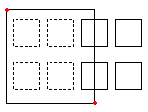
窗口(W) |
指定完全位于由两个对角点定义的矩形内的所有实体。 |
|---|---|
|
矩形选择**窗口**由两个对角点定义。 一个矩形选择**窗口**由两个对角点定义。将指针定位在选择窗口的第一个角上,并单击该点。单击第二个角点以指定完全位于窗口内的所有实体。 |
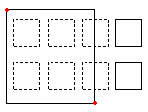
交叉(C) |
指定由两个对角点定义的矩形内的对象。这些对象可以延伸到矩形之外。 |
|
当使用**交叉**选择方法指定实体时,将选择其轮廓与窗口相交或位于窗口内的实体。放置指针,使其窗口包含或与所需的绘图实体相交。 将指针定位到其窗口包含或交叉所需的绘图实体的位置。 |
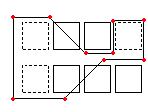
多边形窗选 (wp) |
指定完全位于由指定点定义的多边形内部的实体。 |
|
类似于**窗选**模式,窗选多边形模式指定其轮廓完全位于选择窗口内的所有绘图实体。与**窗选**模式不同,窗选多边形模式允许您使用无限角点绘制不规则窗口。要使用**WPolygon**,请定义选择窗口的角点。多边形线可以相互相交并形成环。按**Enter**键完成选择窗口。所有完全位于窗口内的实体都将被选中。 类似于**窗选**模式,窗选多边形模式指定其轮廓完全位于选择窗口内的所有绘图实体。与**窗选**模式不同,窗选多边形模式允许您使用无限角点绘制不规则窗口。要使用**WPolygon**,请定义选择窗口的角点。多边形线可以相互相交并形成环。按**Enter**键完成选择窗口。所有完全位于窗口内的实体都将被选中。 |
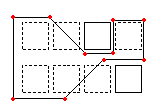
CPolygon (cp) |
指定由指定点定义的多边形内的对象。这些对象可以延伸到多边形之外。 |
|
套索选择方法可创建不规则形状的轮廓。将选择定位在套索轮廓内部且可能与之相交的所有对象。 定义选择窗口的角点。预览模式将显示新形成的多边形。多边形线条可以自我相交并形成环。按 Enter 键可完成选择窗口。将指定位于圈交多边形内或者与圈交多边形相交的所有对象以进行修改。 |
栏选(F) |
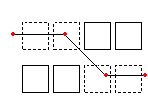
指定所有穿过您所确定围栏的实体。围栏方法类似于 CPolygon,只不过围栏不闭合。 |
|
栏选模式是交叉选择模式的一种有效变体。要指定的实体不是由窗口包围或穿过,而是被一条线,或称“栏选”,从中“切过”。使用无限点定义栏选线。栏选线可以与自身相交。按 Enter 键完成栏选线。所有与该线相交的实体都会被添加到选择集中。 栏选模式是交叉选择模式的一种有效变体。要指定的实体不是由窗口包围或穿过,而是被一条线,或称“栏选”,从中“切过”。使用无限点定义栏选线。栏选线可以与自身相交。按 Enter 键完成栏选线。所有与该线相交的实体都会被添加到选择集中。 |
上一个(P) |
重新指定最近的实体选择集。 |
撤消选项可撤销最近的选择。 Previous 选项恢复上一次选择集。注意:与 Last 和 All 方法一样,冻结图层上的实体不会被选择,而锁定图层上的实体会被选择但无法被处理。 |
|
最后一个(L) |
指定最近创建的可见实体。 |
角度选项用于更改标注文字的角度。 最后选项会将最后绘制的图元添加到选择集。注意:如果最后绘制的图元位于冻结图层上,则不选择任何图元。 |
|
对象组(EG) |
指定某个指定对象组内的实体。 |
EGroup 选项选择名称指定的图元组中的图元。使用 EntityGroup 命令创建图元组。 |
|
添加(A) / 移除(R) |
在添加模式(默认)与移除模式之间切换。 |
添加选项是默认模式,让您随时指定实体并将它们添加到选择集。 添加选项是默认模式,允许您指定实体并随时将它们添加到选择集中。移除选项则从选择集中移除先前选择的实体。移除模式将实体选择提示更改为**移除实体**。已选择的实体如果再次被选择,将从选择集中移除。 |
|
撤消(U) |
取消选择最近选择的实体。 |
撤消选项可撤销最近的选择。 |
|
所有(ALL) |
指定所有图层上的所有对象。 |
所有选项选择图形中的所有对象,冻结的图层上的对象除外。 |
|
单选(SI) / 多选(M) |
在单选和多选方法之间切换。 |
在**单一**模式下,您指定一个实体,然后实体选择完成。 单一模式下,您指定一个实体,然后实体选择完成。多重模式下,您可以通过指定多个点来选择实体,而无需高亮显示实体。多重模式还会选择两个相交的实体,即使两次选择的是同一个交点。 |
|
自动(AU) |
切换到自动模式,在该模式下,指向某个对象将选择该对象。指向一个空位置将启动一个对象选择框。 |
自动和**所有**是用于对象选择的默认模式。 |
|
框选(BOX) |
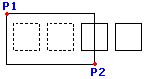
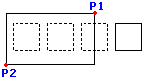
框选。通过结合窗口和交叉选择方法的指针来指定实体。如果从右到左指定选择矩形的对角点,则“框选”等效于“交叉选择”。否则,“框选”等效于“窗口选择”。 |
|
从左到右绘制窗口可选择选择窗口内的实体。 从右向左绘制选择窗口将指定选择窗口内以及与选择窗口相交的实体。 |
相关主题
父主题