
Použití metody výběru entit
Při výzvě k určení entit zadejte jednu z možností (nebo zkratku v závorce) z následující tabulky.
Okno (w) |
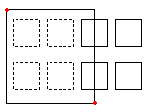
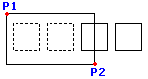
Určuje všechny entity, které úplně leží v obdélníku definovaném dvěma protilehlými body. |
|---|---|
|
Obdélníkové výběrové Okno je definováno dvěma protilehlými rohovými body. Obdélníkový výběr Okno je definován dvěma protilehlými rohovými body. Umístěte ukazatel na první roh výběrového okna a klikněte na tento bod. Klikněte na druhý rohový bod, abyste určili všechny objekty, které se nacházejí zcela uvnitř okna. |
Křížení (c) |
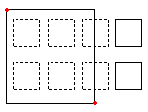
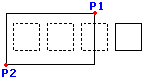
Určuje entity uvnitř obdélníku definovaného dvěma protilehlými body. Entity lze prodloužit za obdélník. |
|
Když se pro určené entity použije metoda Křížení, jsou vybrány entity, jejichž obrysy protínají nebo leží v okně. Umístěte ukazatel tak, aby jeho okno zahrnovalo nebo protínalo požadované entity výkresu. |
OMnohoúhelník (wp) |
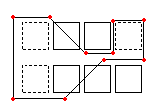
Určuje entity, které zcela leží uvnitř mnohoúhelníku určeného určenými body. |
|
Jako režim Okno, režim Okno mnohoúhelník určuje všechny entity výkresu, jejichž obrys leží zcela uvnitř výběrového okna. Na rozdíl od režimu Okno vám režim Okno mnohoúhelník umožní načrtnout nepravidelné okno s neomezenými rohovými body. Jako režim Okno, režim Okno mnohoúhelník určuje všechny entity výkresu, jejichž obrys leží zcela uvnitř výběrového okna. Na rozdíl od režimu Okno vám režim Okno mnohoúhelník umožní načrtnout nepravidelné okno s neomezenými rohovými body. |
KMnohoúhelník (cp) |
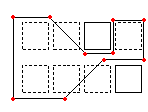
Určuje entity uvnitř mnohoúhelníku definovaného určenými body. Entity lze prodloužit za mnohoúhelník. |
|
Metoda výběru smyčkou vytvoří obrys nepravidelného tvaru. Vyberou se všechny entity, které jsou umístěny uvnitř obrysu smyčky, a pravděpodobně i ty, které smyčka protne. Určete rohové body výběrového okna. Předcházející režim ukáže vznikající mnohoúhelník. Čáry mnohoúhelníku se mohou protínat a vytvářet smyčky. Pro dokončení výběrového okna stiskněte Enter. Ke změně jsou určeny všechny entity, které leží uvnitř anebo protínají křížící mnohoúhelník. |
Ohraničení (f) |
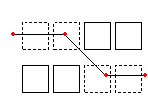
Určuje všechny entity, které procházejí vámi určeným ohraničením. Metoda Ohraničení je podobná KMnohoúhelník až na to, že ohraničení není uzavřené. |
|
Režim Ohrada je účinnou variantou režimu výběru překřížením. Objekty, které chcete specifikovat, nejsou uzavřeny ani překříženy oknem, ale místo toho jsou „proříznuty“ čarou, nebo „ohradou“. Definujte ohradu pomocí neomezeného počtu bodů. Ohrada se může sama protínat. Stiskněte Enter pro dokončení ohrady. Všechny objekty, které protínají čáru, jsou přidány do sady výběru. Režim Ohrada je účinnou variantou režimu výběru překřížením. Objekty, které chcete specifikovat, nejsou uzavřeny ani překříženy oknem, ale místo toho jsou „proříznuty“ čarou, nebo „ohradou“. Definujte ohradu pomocí neomezeného počtu bodů. Ohrada se může sama protínat. Stiskněte Enter pro dokončení ohrady. Všechny objekty, které protínají čáru, jsou přidány do sady výběru. |
Předchozí (p) |
Opět určuje poslední množinu výběrů. |
Možnost Zpět vrací zpět poslední výběr. Poznámka: Jako u metod Poslední a Vše nebudou vybrány zmražené hladiny a entity na zamčených hladinách budou vybrány, ale nelze s nimi manipulovat. |
|
Poslední (l) |
Určuje poslední vytvořenou viditelnou hladinu. |
Možnost Úhel mění úhel textu kóty. Poznámka: Pokud je poslední entita umístěna na zmražené hladině, nebude vybrána žádná entita. |
|
Skupina (eg) |
Určuje entity určené skupiny entit. |
Možnost EGroup vybere objekty EntityGroup určené názvem skupiny. Vytvořte EntityGroups pomocí příkazu EntityGroup. |
|
Přidat (a) / Odstranit (r) |
Přepíná mezi výchozími režimy přidat a odstranit. |
Možnost Přidat je výchozí režim, který vám umožňuje určit entity a přidat je kdykoli do sady výběru. Možnost Odstranit místo toho odstraní předchozí vybrané entity z množiny výběrů. Režim Odstranit změní výzvu k výběru entit na Odstranit entity. Již vybrané entity budou, pokud budou opět vybrány, odstraněny z množiny výběrů. |
|
Zpět (u) |
Zruší výběr posledních vybraných entit. |
Možnost Zpět vrací zpět poslední výběr. |
|
Vše (all) |
Určuje všechny entity na hladině. |
Možnost Vše vybere všechny entity ve výkresu kromě těch, které jsou umístěny ve zmražených hladinách. |
|
Jedna (si) / Více (m) |
Přepíná mezi metodou výběru Jedna a Více. |
V režimu Jeden určíte jednu entitu, poté je výběr entity dokončen. V režimu Více vyberete entity určením více bodů, aniž by se entity zvýraznily. Vícenásobný režim také vybere dvě protínající entity, i když je průsečík vybrán dvakrát. |
|
Auto (au) |
Přepne do automatického režimu, kde entitu vyberete ukázáním na entitu. Ukázání na prázdné umístění spustí okno Výběr entit. |
Auto a Vše jsou výchozí režimy výběru entit. |
|
Rámeček (box) |
Určí entity metodou ukazatele, která je kombinací Okna a Křížení. Pokud jsou určeny protilehlé body výběrového obdélníku zprava doleva, je rámeček ekvivalentní křížení. Jinak je rámeček ekvivalentní oknu. |
|
Nakreslení okna zleva doprava určuje entity ve výběrovém okně. Nakreslení okna zprava doleva určuje entity, které jsou uvnitř nebo protínají výběrové okno. |
Příbuzná témata
Nadřazené téma