
Splitting Multiple Entities
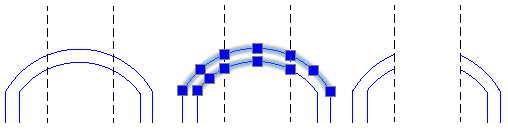
The Split@Multiple command lets you split multiple entities using other entities as cutters.
Use the command with Lines, Circles, Arcs, PolyLines, Ellipses, Splines, InfiniteLines, and Rays, but not with RichLines.
To split multiple entities:
Do one of the following:
On the ribbon, click Home > Modify > Split Multiple.
Type Split@Multiple.
In the graphics area, specify the entities to split and press Enter.
Specify one or more splitting entities and press Enter.
The entities are split at the intersection with the splitting entities.
Note: Parts of the original entities are not automatically deleted. If necessary, you can manually delete them.
Example:
Access
Command: Split@Multiple
Ribbon: Home > Modify > Split Multiple
Related Topics
Changing the Length of Entities
Parent Topic