
Adding a Numbering Sequence to Text Entities
Use the NumberText command to insert sequential numbering to selected text entities.
You can add the sequence as a prefix or as a suffix. Additionally, you can overwrite the existing text.
To add numbering sequence to selected text entities:
Aşağıdakilerden birini yapın:
On the ribbon, click XtraTools > Annotation > Number Text.
On the menu, click XtraTools > Annotation > Number Text.
Type NumberText.
In the dialog box, select the sorting method:
Position X. Sorts the text entities by X coordinate of the insertion point of each text entity.
Position Y. Sorts the text entities by Y coordinate of the insertion point of each text entity.
Select order. Sorts the text entities according to the selection order.
Relative to one point. Sorts the text entities by the distance of each entity to a given point.
Relative to two points. Sorts the text entities by the distance of each entity to a theoretical rectangle defined by two given points.
Seçenekleri belirtin:
In Text placement, specify how to apply the sequential numbering:
Prefix. Places the sequence as prefix of selected text entities.
Suffix. Places the sequence as suffix of selected text entities.
Replace. Lets you specify the string from the text entities, which you want to replace with the sequential value.
Overwrite. Sequential value replaces all current text of entities.
In Text format, specify an additional prefix and suffix to the number sequence (not the original texts).
In Sorting direction, select an ascending or a descending order.
In Counter, specify the counting settings:
Initial value. First number of the sequence.
Increment. The difference between the numbers in the sequence.
Digits. Number of digits of each sequence number.
Tamam’a tıklayın.
In the graphics area, select the text entities.
Enter tuşuna basın.
Examples:
Initial value = 1, Increment = 1, Text placement: Prefix;
Prefix = N°, Suffix = x1.
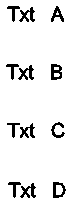
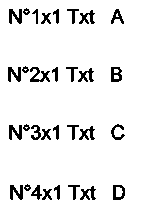
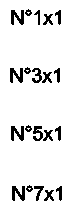
Initial value = 1, Increment = 2, Text placement: Overwrite;
Prefix = N°, Suffix = x1.
Erişim
Command: NumberText
Menu: XtraTools > Annotation > Number Text
Ribbon: XtraTools > Annotation > Number Text
Üst Öğe Konusu