
Stairs Representation
A 3D model of a building may contain stairs. Stairs are visible in the 3D model, as well as in BIM drawings that are generated from the BIM model.
Supported BIM files: IFC and RVT.
Elements of a stair:
Runs
Landings
Supports
Railing
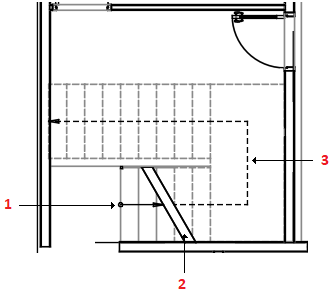
At the moment, in drawings, the representation of a stair includes:
Direction of the stair
Break symbol
Walking line
The appearance of stairs in BIM drawings depends on the position of the cutting plane. The break symbol shows the cutting plane position from the 3D model.
Stair treads and the walking line above the cutting plane appear dashed
Stair treads and the walking line below the cutting plane appear with solid line
Related Topics