
Constructing Rays
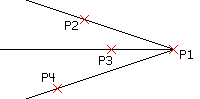
A Ray is a Line that extends indefinitely in one direction from its origin. You can use Rays to establish frameworks or grids from which you construct a drawing.
To construct one or more Rays:
Click Draw > Ray (or type Ray).
In the graphics area, specify the:
Ray’s start point.
First Ray direction.
Different through points to define other Rays through the same origin, or press Enter.
 Draw Rays on separate Layers that you can turn off or freeze prior to printing. Alternatively, delete Rays when the drawing is complete.
Access
Command: Ray
Menu: Draw > Ray
Ribbon: Home > Draw > (Flyout) Ray
Related Topics