
Modifying Existing Dimensions for BIM Entities
There are the following methods for modifying dimensions for BIM entities:
Using grip points
Using the Properties palette
Using the BIMDimensionEdit command
Use the BIMDimensionEdit command to modify existing dimension chains.
The command lets you:
Add dimension points to dimension line
Delete dimension points from dimension line
Automatically dimension additional BIM entities within the same dimension chain
Automatically update the dimension chain when a BIM entity is removed
The specialized tools for modifying dimensions are grouped on the Annotate panel of the BIM ribbon tab.
To add dimension points to a dimension line:
Do one of the following:
On the ribbon, click BIM > Annotate > Add Point
 .
.
On the menu, click BIM > Dimension > Dimension Edit > Add Point.
Type BIMDimensionEdit and specify the Add points option.
In the graphics area, specify the dimension chain to modify.
In the graphics area, specify the points to dimension and press Enter.
Specify the index of the dimension line and press Enter. 0 means the first dimension line from the chain.
To delete a dimension point from a dimension chain:
Do one of the following:
On the ribbon, click BIM > Annotate > Remove Points
 .
.
On the menu, click BIM > Dimension > Dimension Edit > Remove Point.
Type BIMDimensionEdit and specify the Remove points option.
In the graphics area, specify the dimension chain from which to remove dimension points.
On the BIM model, specify the point to remove.
Note: Make sure to specify only points corresponding to extension lines from the dimension chain.
To dimension additional BIM entities within a specified dimension chain:
Do one of the following:
On the ribbon, click BIM > Annotate > Add Entity
.
On the menu, click BIM > Dimension > Dimension Edit > Add Entity.
Type BIMDimensionEdit and specify the Add Entity option.
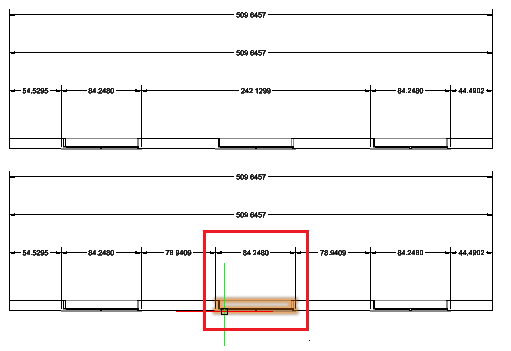
In the graphics area, specify the dimension chain to modify.
Specify the BIM entities to dimension and press Enter.
Corresponding dimension points are added to the dimension chain.
For example, you can specify a window to consider it in the dimension chain.
To detach a BIM entity from a specified dimension chain:
Do one of the following:
On the ribbon, click BIM > Annotate > Remove Entity
 .
.
On the menu, click BIM > Dimension > Dimension Edit > Remove Entity.
Type BIMDimensionEdit and specify the Remove Entity option.
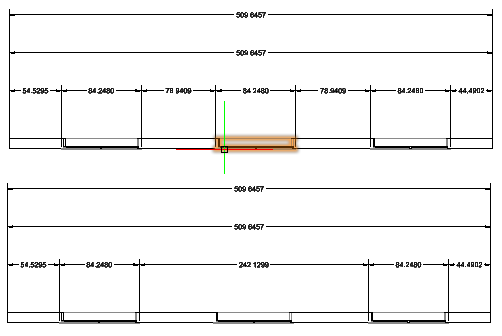
In the graphics area, specify the dimension chain from which to detach BIM entities.
Specify the BIM entities to detach and press Enter.
The dimension points belonging to the specified BIM entities are removed from the dimension chain.
Access
Command: BIMDimensionEdit
Menu: BIM > Dimension > Dimension Edit
Related Topics
Parent Topic