
Constructing Circles
You can use one of several methods to create Circles.
To construct a Circle from its center point and radius:
Click Draw > Circle > Center, Radius (or type Circle).
In the graphics area, specify the:
Center point of the Circle.
Circle radius.
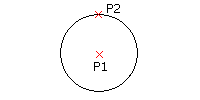
To construct a Circle from its center point and diameter:
On the menu, click Draw > Circle > Center, Diameter.
In the graphics area, specify the:
Center point of the Circle.
Circle diameter.
To construct a Circle from three points:
Click Draw > Circle > 3 Points (or type Circle then specify the 3Point option).
In the graphics area, specify three points that define points on the Circle.
To construct a Circle from two points along the diameter:
Click Draw > Circle > 2 Points (or type Circle then specify the 2Point option).
In the graphics area, specify two points that define the Circle diameter.
To construct a Circle from two tangent entities and the radius:
Click Draw > Circle > Tangent, Tangent, Radius (or type Circle then specify the Ttr option).
In the graphics area:
Select a point on each of two linear entities that define lines tangent to the Circle.
Specify two points to define the radius, or type the radius value.
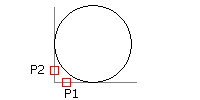
To construct a Circle that is tangent to three lines:
Click Draw > Circle > Tangent, Tangent, Tangent (or type Circle then specify the TTT option).
In the graphics area, specify a point on three linear entities that define lines tangent to the Circle.
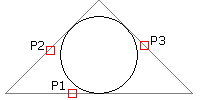
 This option is useful when inscribing the Circle within a regular polygon.
Access
Command: Circle
Menu: Draw > Circle
Tool Palettes: Draw > Circle
Ribbon: Home > Draw > Circle > Circle
Related Topics