
Constructing Polygons
A polygon is a closed linear PolyLine entity consisting of 3 to 1024 equal length sides.
To construct polygons:
Click Draw > Polygon (or type Polygon).
Type the number of sides.
Do one:
In the graphics area, specify the center of the polygon.
Specify an option:
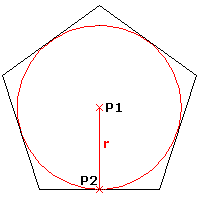
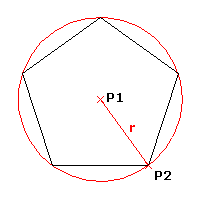
Corner. Encloses the polygon within a circle that touches the polygon at its corners (inscribed).
Side. Encloses a circle with the polygon that touches the circle at the corners (circumscribed).
Specify a point in the graphics area to define the radius or type a value for the radius.
- or -
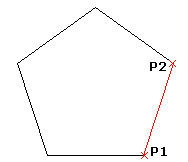
Specify the Side length option to define an edge of the polygon.
Specify the edge start point and side length.
Access
Command: Polygon
Menu: Draw > Polygon
Ribbon: Home > Draw > (Flyout) Polygon
Tool Palettes: Draw > Polygon
Related Topics