
エンティティ選択方法の適用(Applying Entity Selection Methods)
エンティティの指定を求めるプロンプトが表示された場合、次のテーブルからオプションの1つ(または括弧内のショートカット)を入力します。
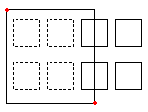
ウィンドウ(W) |
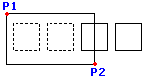
対角線上の2つの点で定義される四角形に完全に入るすべてのエンティティを指定します。 |
|---|---|
|
長方形の選択 ウィンドウ は、対角線上にある 2 番目のコーナーポイントによって定義されます。 選択ウィンドウの最初の角にポインタを配置し、その点をクリックします。2 番目のコーナーポイントをクリックして、ウィンドウ内に完全に位置するすべてのエンティティを指定します。 |
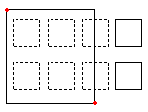
交差(C) |
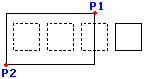
対角線上の2つの点で定義される四角形に入るエンティティを指定します。 エンティティの一部が四角形の外に出ていてもかまいません。 |
|
交差 方法を使用してエンティティを指定する場合、アウトラインがウィンドウと交差するか、またはウィンドウ内にあるエンティティが選択されます。 ウィンドウが目的の図面エンティティを含むか交差するようにポインタを配置します。 |
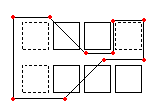
WPolygon (wp) |
指定された点で定義されるポリゴン内に完全に入るエンティティを指定します。 |
|
ウィンドウ モードと同様に、ウィンドウポリゴン モードは、輪郭が選択ウィンドウの完全に内側にあるすべての図面エンティティを指定します。ウィンドウ モードとは異なり、ウィンドウポリゴン モードでは、無制限のコーナーポイントを持つ不規則なウィンドウをスケッチできます。 WPolygon を使用するには、選択ウィンドウ of コーナーポイントを定義します。ポリゴン線は交差してループを形成できます。Enter を押して選択ウィンドウを完了します。ウィンドウの完全に内側にあるすべてのエンティティが選択されます。 |
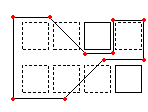
ポリゴン交差(CP) |
指定された点で定義されるポリゴンに入るエンティティを指定します。 エンティティの一部が四角形の外に出ていてもかまいません。 |
|
交差ポリゴン 選択モードも、無制限のコーナーポイントを持つ不規則な形状のウィンドウを作成します。選択ポリゴンの内側にあるか、または選択ポリゴンと交差するすべてのエンティティが指定されます。 選択ウィンドウのコーナーポイントを定義します。プレビューモードでは、生成中のポリゴンが表示されます。ポリゴン線は交差してループを形成できます。Enter を押して選択ウィンドウを完了します。交差ポリゴンの内側にある、および交差するすべてのエンティティが変更のために指定されます。 |
フェンス(F) |
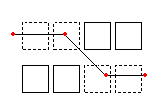
決定したフェンスを通過するすべてのエンティティを指定します。フェンスメソッドはCPolygonに似ていますが、フェンスは閉じられません。 |
|
フェンス モードは、交差選択モードの効果的なバリエーションです。指定するエンティティはウィンドウに囲まれたり交差されたりするのではなく、線、つまり「フェンス」によって「切断」されます。 無制限のポイントでフェンスを定義します。フェンスは交差することができます。Enter を押してフェンスを完了します。線と交差するすべてのエンティティが選択セットに追加されます。 |
前の(P) |
直近で使用したエンティティ選択セットをもう一度指定します。 |
前 オプションは、直前の選択セットを復元します。 注記: 最後 および すべて の方法と同様に、フリーズされた画層上のエンティティは選択されず、ロックされた画層上のエンティティは選択されますが処理できません。 |
|
最後の(L) |
直近で作成された表示状態のエンティティを指定します。 |
最後 オプションは、最後に描画されたエンティティを選択セットに追加します。 注記: 最後に描画されたエンティティがフリーズされた画層上にある場合、エンティティは選択されません。 |
|
グループ (例) |
エンティティグループのエンティティを指定します。 |
EGroup オプションは、グループ名で指定された EntityGroup のエンティティを選択します。 EntityGroup コマンドを使用して EntityGroup を作成します。 |
|
追加(A)/削除(R) |
デフォルトの追加および削除モードを切り替えます。 |
追加 オプションはデフォルトのモードで、いつでもエンティティを指定して選択セットに追加できます。 削除 オプションは、代わりに以前に選択したエンティティを選択セットから削除します。削除 モードは、エンティティ選択プロンプトを エンティティを削除 に変更します。既に選択されているエンティティが再度選択されると、選択セットから削除されます。 |
|
元に戻す(U) |
直前に選択されたエンティティを選択解除します。 |
元に戻す(Undo)オプションは直前の選択を元に戻します。 |
|
All (all) |
すべての画層のすべてのエンティティを指定します。 |
Allオプションはフリーズ画層以外の図面内のすべてのエンティティを選択します。 |
|
単一(SI)/複数(M) |
単一/複数選択モードを切り替えます。 |
単一 モードでは、1 つのエンティティを指定すると、エンティティの選択が完了します。 複数 モードでは、エンティティをハイライト表示せずに複数のポイントを指定してエンティティを選択します。複数モードでは、交点が 2 回選択された場合でも、2 つの交差するエンティティが選択されます。 |
|
自動(AU) |
エンティティをポイントすることにより選択する自動モードに切り替えます。 何もないところをポイントするとエンティティ選択ボックスが開始されます。 |
自動 と All はエンティティ選択のデフォルトモードです。 |
|
直方体(BOX) |
ポインタでエンティティを指定する方法で、ウィンドウと交差を組み合わせたものです。 選択する四角形の対角線上の点を右から左に指定すると、交差モードと同じになります。 そうでない場合にはウィンドウと同じになります。 |
|
ウィンドウを左から右に作成すると、選択ウィンドウ内に完全に含まれるエンティティが指定されます。 右から左にウィンドウを作成すると、選択ウィンドウに含まれるエンティティと交差するエンティティが指定されます。 |
関連トピック
親トピック