
Creating Two Parallel Construction Lines Tangent to a Circle
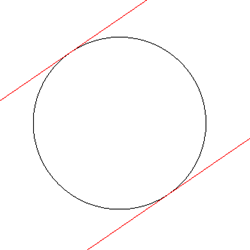
Use the AM_ConstTan command to create two parallel construction lines that are tangent to a specified circle or arc.
To create two parallel construction lines that are tangent to a specified circle or arc:
Type AM_ConstTan at the command prompt.
In the graphics area, do the following:
Specify a circle or an arc.
Specify a point to define the direction of the parallel construction lines
- or -
Specify the Angle option and type an angle value to define the direction of the parallel construction lines.
 To draw multiple construction lines at once, specify a set of angle values separated by |.
Repeat steps a and b as necessary, or press Enter.
Access
Command: AM_ConstTan
Related Topics
Parallel and Perpendicular Construction Lines
Construction Lines at an Angle
Parent Topic