
Creating a Centerline Cross at a Specified Point
Use the AM_CenterCross command to create a centerline cross at a specified point.
The command always aligns the cross with the CCS. To draw a centerline cross with a different angle, change the CCS accordingly.
To create a centerline cross at a point:
Before starting, make sure the CCS has the suitable orientation.
Do one of the following:
On the ribbon, click Home > Centerlines > Centerlines > Centerline cross.
Type AM_CenterCross.
In the graphics area, specify a point. For example, you can specify the centerpoint of a circular entity.
The command draws a centerline cross from the specified center point and extends it in all four directions as you move the cursor.
Click a point to place the centerline cross or specify the diameter and press Enter.
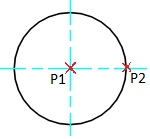
Example:
You can use the AM_CenterCross command to place a centerline cross for a hole. In this case, you can click a point on the circle instead of specifying the diameter.
The centerline cross extends beyond the circle.
Access
Ribbon: Home > Centerlines > Centerlines > Centerline cross
Command: AM_CenterCross
Related Topics
Parent Topic