
Aligning Dimensions
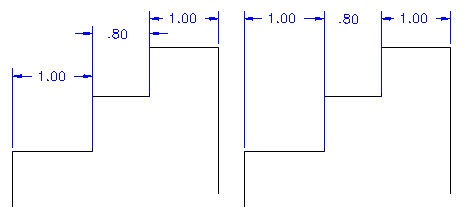
Use the AM_DimAlign command to align dimensions.
You can align:
Linear dimensions that are parallel to a specified base linear dimension.
Ordinate dimensions whose extension lines are parallel to a specified the base dimension.
Angular dimensions that measure the same vertex as the specified base angular dimension.
To align dimensions:
Do one of the following:
On the ribbon, click Mechanical Annotate > Dimension Tools > Align.
On the menu, click Mechanical Annotate > Dimension Tools > Align.
Type AM_DimAlign.
In the graphics area, specify the a dimension to use as the base dimension. You can select a linear, ordinate, or angular dimension.
Specify additional dimensions to align with the base dimension.
Note: The base dimension and the dimensions you select for aligning must be of the same type.
Press Enter.
Access
Command: AM_DimAlign
Menu: Mechanical Annotate > Dimension Tools > Align
Ribbon: Mechanical Annotate > Dimension Tools > Align
Parent Topic